
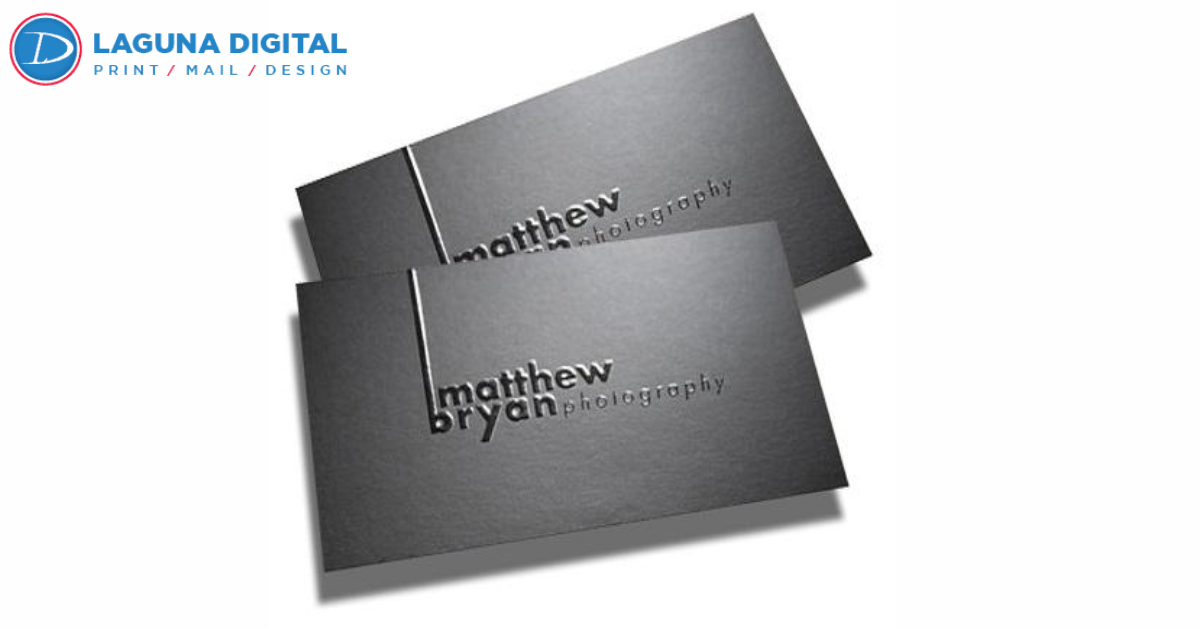
We have all been there: you are at a networking event, the conversation is flowing perfectly, and the moment comes to exchange contact information. You reach into your pocket and hand over a business card. In that split second, a judgment is made. Does the card feel flimsy and cheap, or does it feel substantial and professional? That small piece of paper is often the only physical reminder a potential client has of you after the meeting ends.
As a printing service provider, I have seen thousands of designs come through our shop some breathtakingly effective, and others that, unfortunately, end up in the recycling bin. The difference usually isn’t the budget, it is the thought process behind the design. When you invest in high-quality Business Cards, you are investing in your brand’s reputation. A well-designed card acts as a silent ambassador for your business, continuing to do the work long after you have left the room.
Designing for print is very different from designing for a screen. There are tactile elements, color constraints, and spatial limitations that you must respect to get a great result. In this guide, I want to walk you through the practical steps and insider tips that will ensure your next batch of business cards captures attention and converts leads.
Mastering the Technical Fundamentals of Print
One of the most common heartbreaking moments in our industry is telling a client that their beautiful digital design won’t translate well to paper. This usually happens because the technical setup of the file was ignored. To ensure your cards look crisp and professional, you have to start with the right foundation. This means understanding bleed and safe zones.
Bleed refers to the area of the design that extends beyond the final cut line. If you want a background color or image to go all the way to the edge of the card, you must extend the artwork about 1/8th of an inch past the trim line. Without this, even a fraction of a millimeter shift during the cutting process can result in an unsightly white hairline on the edge of your card. Always keep essential text away from the edges to ensure nothing gets chopped off.
Another crucial factor is color mode. Screens display color using RGB (Red, Green, Blue) light, which can look incredibly vibrant. However, professional digital printing uses CMYK (Cyan, Magenta, Yellow, Key/Black) ink. If you design in RGB and print in CMYK, those neon greens and electric blues will look muddy and dull. Always set your design software to CMYK mode before you start to avoid disappointment when you open the box.
Choosing Materials That Stand Out
The texture and weight of your card communicate just as much as the words printed on it. A standard flimsy card might suggest you are cutting corners, whereas a thick, heavy stock implies stability and quality. However, standing out in a crowded market sometimes requires looking beyond traditional cardstock.
The Case for Durability and Uniqueness
If your industry involves hands-on work, outdoor environments, or you simply want a card that is virtually indestructible, you should look into alternative materials. Plastic cards are gaining massive popularity not just for their durability, but for the premium feel they offer. They are waterproof, tear-proof, and distinct. You can learn more about why plastic cards are the future to see if this fits your brand identity.
Breaking the Mold with Shape
Another way to disrupt the norm is by altering the physical shape of the card. While the standard rectangle is classic, it can sometimes get lost in a stack. Rounded corners or completely round cards offer a modern, friendly aesthetic that tactilely feels different in the hand. If you are considering this route, check out our guide on how to design round business cards to ensure your layout complements the curvature.
Layout and Typography Essentials
When it comes to business cards, less is almost always more. I often see clients trying to cram a biography, a list of ten services, and three different phone numbers onto a 3.5 x 2-inch canvas. The result is a cluttered mess that is impossible to read. Your business card is a gateway to your business, not a catalog. It needs to provide just enough information to entice the recipient to contact you or visit your website.
Hierarchy is key. Your name or your company name should be the dominant element. Following that, your title and contact method (email or phone) should be clear. Typography plays a huge role here; avoid using more than two font families. A clean sans-serif for contact info paired with a bold serif for your name often creates a professional balance. Ensure your font size is legible never go below 7pt or 8pt for critical information.
Remember, white space (or negative space) is your friend. It gives the eye a place to rest and makes the important information pop. If you are struggling with what to include and what to cut, looking at strategies for business cards printing for small business marketing can help you prioritize the data that actually drives sales.
Incorporating Visuals and Imagery
While typography is central, the visual elements are what grab attention from a distance. Your logo should be high-resolution (at least 300 dpi) to ensure it doesn’t look pixelated. A blurry logo instantly degrades trust. For some professions, like real estate or personal coaching, including a headshot is a great way to build a personal connection.
If you decide to use photography on your card, whether it is a product shot or a portrait, the color balance and sharpness must be perfect. Muddy photos look unprofessional. Our photo printing standards ensure that images remain sharp and vibrant, but the source file you provide must be high quality to begin with.
Staying Current with Design Trends
Design isn’t static; it evolves. What looked modern ten years ago may look dated today. Currently, we are seeing a shift toward minimalism, soft-touch coatings, and the integration of technology. QR codes, for example, have made a massive comeback. They bridge the gap between print and digital, allowing you to link directly to a portfolio or a booking page.
However, following trends blindly can be dangerous if it doesn’t align with your brand voice. A law firm might not benefit from a neon-colored, graffiti-style card, whereas a graphic designer certainly might. Staying educated on top business cards design trends helps you make informed decisions about finishes like Spot UV or foil stamping that can elevate your card without looking gimmicky.
Consistency Across Your Brand Ecosystem
Finally, your business card does not exist in a vacuum. It is part of a larger ecosystem of marketing materials. When I work with clients at Laguna Digital, I always emphasize that the colors, fonts, and vibe of the business card should match their website, their brochures, and their signage.
If you hand someone a sleek, modern black-and-white business card, but then hand them a colorful, chaotic brochure, the disconnect confuses the customer. Brand consistency builds trust. Whether you are looking into book printing for corporate catalogs or simple flyers, maintaining that visual thread is essential for professional credibility.
SEO Title: How to Design for Effective Business Cards Printing | Expert Guide
Meta Description: Learn how to design for effective business cards printing with professional tips on layout, materials, and file prep to make a lasting impression.
How to Design for Effective Business Cards Printing
We have all been there: you are at a networking event, the conversation is flowing perfectly, and the moment comes to exchange contact information. You reach into your pocket and hand over a business card. In that split second, a judgment is made. Does the card feel flimsy and cheap, or does it feel substantial and professional? That small piece of paper is often the only physical reminder a potential client has of you after the meeting ends.
As a printing service provider, I have seen thousands of designs come through our shop—some breathtakingly effective, and others that, unfortunately, end up in the recycling bin. The difference usually isn’t the budget; it is the thought process behind the design. When you invest in high-quality Business Cards Printing, you are investing in your brand’s reputation. A well-designed card acts as a silent ambassador for your business, continuing to do the work long after you have left the room.
Designing for print is very different from designing for a screen. There are tactile elements, color constraints, and spatial limitations that you must respect to get a great result. In this guide, I want to walk you through the practical steps and insider tips that will ensure your next batch of business cards captures attention and converts leads.
Mastering the Technical Fundamentals of Print
One of the most common heartbreaking moments in our industry is telling a client that their beautiful digital design won’t translate well to paper. This usually happens because the technical setup of the file was ignored. To ensure your cards look crisp and professional, you have to start with the right foundation. This means understanding “bleed” and “safe zones.”
Bleed refers to the area of the design that extends beyond the final cut line. If you want a background color or image to go all the way to the edge of the card, you must extend the artwork about 1/8th of an inch past the trim line. Without this, even a fraction of a millimeter shift during the cutting process can result in an unsightly white hairline on the edge of your card. Always keep essential text away from the edges to ensure nothing gets chopped off.
Another crucial factor is color mode. Screens display color using RGB (Red, Green, Blue) light, which can look incredibly vibrant. However, professional digital printing uses CMYK (Cyan, Magenta, Yellow, Key/Black) ink. If you design in RGB and print in CMYK, those neon greens and electric blues will look muddy and dull. Always set your design software to CMYK mode before you start to avoid disappointment when you open the box.
Choosing Materials That Stand Out
The texture and weight of your card communicate just as much as the words printed on it. A standard flimsy card might suggest you are cutting corners, whereas a thick, heavy stock implies stability and quality. However, standing out in a crowded market sometimes requires looking beyond traditional cardstock.
The Case for Durability and Uniqueness
If your industry involves hands-on work, outdoor environments, or you simply want a card that is virtually indestructible, you should look into alternative materials. Plastic cards are gaining massive popularity not just for their durability, but for the premium feel they offer. They are waterproof, tear-proof, and distinct. You can learn more about why plastic cards are the future to see if this fits your brand identity.
Breaking the Mold with Shape
Another way to disrupt the norm is by altering the physical shape of the card. While the standard rectangle is classic, it can sometimes get lost in a stack. Rounded corners or completely round cards offer a modern, friendly aesthetic that tactilely feels different in the hand. If you are considering this route, check out our guide on how to design round business cards to ensure your layout complements the curvature.
Layout and Typography Essentials
When it comes to business cards, less is almost always more. I often see clients trying to cram a biography, a list of ten services, and three different phone numbers onto a 3.5 x 2-inch canvas. The result is a cluttered mess that is impossible to read. Your business card is a gateway to your business, not a catalog. It needs to provide just enough information to entice the recipient to contact you or visit your website.
Hierarchy is key. Your name or your company name should be the dominant element. Following that, your title and contact method (email or phone) should be clear. Typography plays a huge role here; avoid using more than two font families. A clean sans-serif for contact info paired with a bold serif for your name often creates a professional balance. Ensure your font size is legible—never go below 7pt or 8pt for critical information.
Remember, white space (or negative space) is your friend. It gives the eye a place to rest and makes the important information pop. If you are struggling with what to include and what to cut, looking at strategies for business cards printing for small business marketing can help you prioritize the data that actually drives sales.
Incorporating Visuals and Imagery
While typography is central, the visual elements are what grab attention from a distance. Your logo should be high-resolution (at least 300 dpi) to ensure it doesn’t look pixelated. A blurry logo instantly degrades trust. For some professions, like real estate or personal coaching, including a headshot is a great way to build a personal connection.
If you decide to use photography on your card, whether it is a product shot or a portrait, the color balance and sharpness must be perfect. Muddy photos look unprofessional. Our photo printing standards ensure that images remain sharp and vibrant, but the source file you provide must be high quality to begin with.
Staying Current with Design Trends
Design isn’t static; it evolves. What looked modern ten years ago may look dated today. Currently, we are seeing a shift toward minimalism, soft-touch coatings, and the integration of technology. QR codes, for example, have made a massive comeback. They bridge the gap between print and digital, allowing you to link directly to a portfolio or a booking page.
However, following trends blindly can be dangerous if it doesn’t align with your brand voice. A law firm might not benefit from a neon-colored, graffiti-style card, whereas a graphic designer certainly might. Staying educated on top business cards design trends helps you make informed decisions about finishes like Spot UV or foil stamping that can elevate your card without looking gimmicky.
Consistency Across Your Brand Ecosystem
Finally, your business card does not exist in a vacuum. It is part of a larger ecosystem of marketing materials. When I work with clients at Laguna Digital, I always emphasize that the colors, fonts, and vibe of the business card should match their website, their brochures, and their signage.

If you hand someone a sleek, modern black-and-white business card, but then hand them a colorful, chaotic brochure, the disconnect confuses the customer. Brand consistency builds trust. Whether you are looking into book printing for corporate catalogs or simple flyers, maintaining that visual thread is essential for professional credibility.
FAQs
What is the best paper weight for a professional business card?
For a standard professional feel, I recommend nothing less than 14pt or 16pt cardstock. Anything thinner (like 10pt or 12pt) tends to feel flimsy and can be easily creased. If you want a premium, luxury feel, you can go even thicker with 32pt stocks or multi-layered papers.
Is it worth putting a QR code on my business card?
Absolutely. QR codes are incredibly functional today. They can instantly save your contact info into a client’s phone, direct them to a Google Review page, or open your portfolio. Just ensure the code is large enough (at least 0.8 inches) to be scanned easily.
Can I design my business cards in Canva?
Yes, you can, but you must be careful with export settings. Ensure you download your design as a PDF Print with Crop marks and bleed selected. If you just download a standard image file, you may lose resolution or run into sizing issues during the printing process.
Conclusion
Designing an effective business card is a blend of art and engineering. It requires an eye for aesthetics and a respect for the mechanical constraints of the printing process. When done correctly, that small rectangle becomes a powerful tool that opens doors and solidifies relationships. It is the handshake that stays behind when you leave.
Don’t rush the process. Take the time to select the right paper, verify your files, and refine your layout. If you are ever in doubt, consult with your printer we are here to help you look your best. For more insights on print marketing and design tips, be sure to visit our blog. Your business deserves a card that is as professional and unique as the services you provide.