

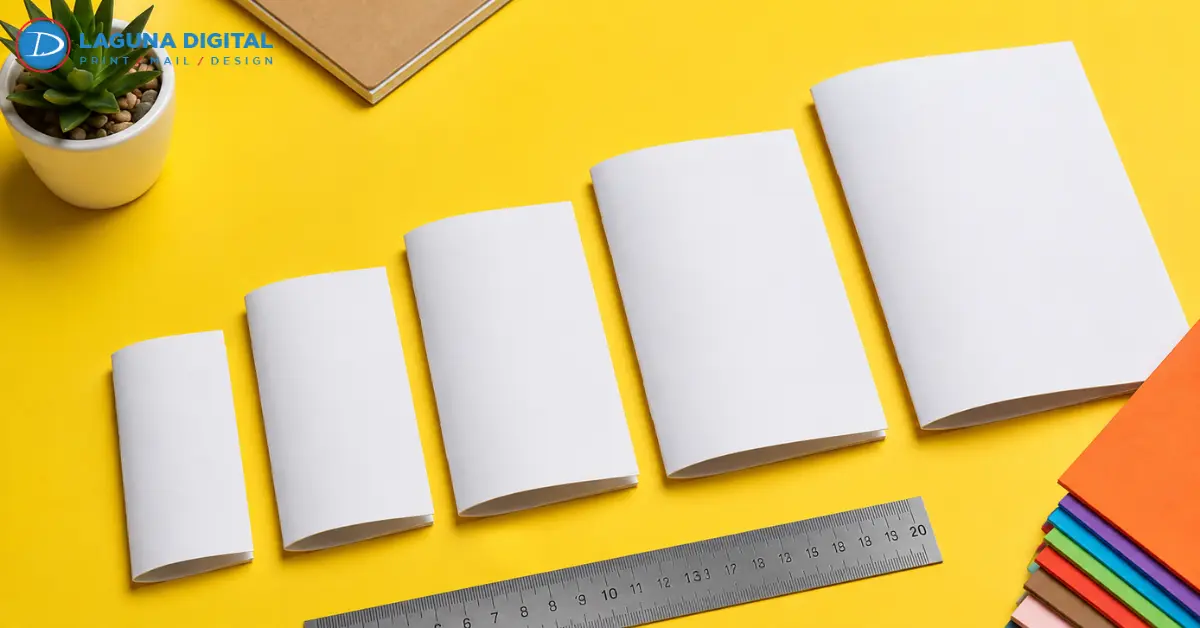
The right saddle stitch booklet size keeps the busiest page easy to read and suits the way the piece will be handled. For many U.S. projects, 5.5 by 8.5 inches works for event programs and short guides. An 8.5 by 11-inch format gives long catalogs, reports, and manuals more room. Landscape and square formats support visual content.
Final size affects line length, photo scale, paper, mailing, and cost. A trimmed paper mockup made before layout provides a clear answer.
Start With the Reader and Finished Use
The booklet should feel right where it will be read. A trade show handout has different needs from a desk guide.
Match the Format to the Reading Situation
Compact business booklets are easy to carry, display, and hand out. The 5.5 by 8.5-inch format gives short sections, schedules, product highlights, and contact details enough room without extra bulk.
Marketing booklets with more content often need a full-letter page for clear charts, long specifications, and large photos. Landscape pages support wide products and charts. Square pages suit artwork, food photos, and brand displays.
Let the Busiest Page Make the Decision
Test the longest table, most crowded product grid, smallest caption, and most complex diagram. Print the sample at 100 percent scale, trim it, and view it from a normal reading distance.
If the type must shrink or margins feel tight, cut the content or increase the format. This booklet design test reveals when strong opening pages hide cramped pages later in the booklet. Product teams can also review how to use booklets for product catalogs before signing off on the page plan.
Compare Common Saddle Stitch Booklet Sizes
Standard sizes make templates, printing, and repeat orders easier. These formats cover most common uses.
Compare Half-Letter and Full-Letter Formats
| Finished size | Suitable content | Main benefit |
| 5.5 by 8.5 inches | Event programs, short guides, compact catalogs | Easy to carry and print |
| 8.5 by 11 inches | Manuals, reports, workbooks, detailed catalogs | More room for text and graphics |
| 8.5 by 5.5 inches | Wide products, charts, panoramic images | Fits wide layouts |
| 6 by 6 inches | Small lookbooks, menus, brand pieces | Easy to handle |
| 12 by 12 inches | Art, photography, premium portfolios | More room for images |
A booklet size refers to its closed, trimmed size. A 5.5 by 8.5-inch portrait booklet opens to an 11 by 8.5-inch spread. Build one final page at a time unless the printer asks for spreads.
Choose Landscape, Square, or Custom Dimensions Carefully
An unusual format should fit a display, align with a package, or give wide images enough space. A custom size cannot repair a weak layout or crowded content.
Laguna Digital offers standard and custom sizes through its custom booklet printing options. Get the template before print design begins. Resizing later can change image crops, line breaks, and page count.
Check Page Count and Paper Together

Page count and paper affect the fold, closure, and final trim of a saddle stitch booklet.
Build the Page Map in Multiples of Four
Each folded sheet creates four pages. The total must be a multiple of four, with all four cover pages in the count. Valid totals include 8, 12, 16, 20, and 24 pages.
Map each section and cover before the draft is final. An 18-page draft needs editing to reach 16 pages or useful new content to reach 20. Filler pages break the reading flow and waste printed space.
Allow for Paper Thickness and Page Creep
A 24-page booklet on text-weight paper may fold neatly, while the same piece on heavy cardstock becomes thicker at the spine. A heavy cover also folds differently from a self-cover made with one stock.
Nested inner pages push outward before trimming. This is page creep. Keep page numbers, borders, and key text well inside the trim area. If the chosen paper makes the booklet too thick, review different types of book binding and their advantages for a better method.
Build the File Around the Final Trim Size
Set size, paper, and page count before preparing artwork. Late changes can disturb image placement and alignment across a spread.
Protect Bleed, Margins, and Image Detail
Edge-to-edge artwork must continue beyond the trim line. Laguna Digital’s file guide calls for one-eighth-inch bleed, crop marks, CMYK color, and 300 dpi artwork. Follow the template supplied with the order.
Keep logos, captions, page numbers, and key text inside the safe area and away from the center fold. Small custom booklets leave less room for changes.
Supply Pages and Proofs in the Requested Form
Most booklet printing workflows accept a press-ready PDF in normal reading order. The print team arranges the press sheet. Making printer spreads without a request can cause errors.
Check blank pages and covers, then embed the fonts. A PDF proof checks text, order, and layout. A hard-copy proof shows scale, paper feel, fold, and color. However,the digital printing services page explains paper and finish choices.
Include Distribution in the Size Decision
The format must also work during handling, display, storage, and mailing.
Review Portability, Display, and Mailing
A compact guide suits events and bags, while a full-letter manual works better on a desk. Before mailing printed booklets, ask for a check of size, weight, thickness, flexibility, packing, and postage.
Test image crops in the chosen page shape, especially across the fold.
Compare the Complete Project Cost
Compare booklet printing services with the same job details for order count, size, pages, stock, coating, proof, turnaround, and delivery. A low unit price can be misleading when another quote includes key finishing.
Businesses that often print booklets should consider storage and consistent reorders. Standard sizes make reorders easier. Custom printing makes sense when the size clearly improves handling or presentation. For more layout ideas, review creating booklets for portfolios and guides.
Complete a Final Production Review
A short check of the physical booklet protects reading ease and print quality.
Review Content and Format
- Confirm the main reader and setting.
- Print the busiest page at full scale.
- Check that type, tables, and captions remain easy to read.
- Count every page, including the four cover pages.
- Verify that the size works for display, packing, storage, and mail.
Review Prepress and Binding
- Confirm interior paper and cover stock before setting the page limit.
- Follow the supplied template for trim, bleed, and safe areas.
- Check color mode, image quality, fonts, and PDF page order.
- Check page creep in thick booklets.
- Sign off on the proof before the full run.
If the booklet is too thick or will be used often, document binding services provide other options for reports, manuals, proposals, and professional documents.
Frequently Asked Questions
What is the most common saddle stitch booklet size?
The 5.5 by 8.5-inch half-letter format suits programs, service guides, and compact catalogs. Use 8.5 by 11 inches when charts, instructions, or large photos need more room.
How many pages should a saddle-stitched booklet contain?
The total must be a multiple of four. The page limit depends on paper thickness, cover stock, final size, and equipment. Confirm it before layout sign-off.
Is 5.5 by 8.5 inches large enough for a product catalog?
It works for a focused product range, short descriptions, and simple image grids. Technical specifications, comparison tables, or many variations usually need a larger page.
Does booklet size affect printing and mailing costs?
Yes. Size affects paper, cutting, packing, storage, weight, and postage. Compare costs using the same pages, stock, order count, proof, and delivery needs.
When is a custom booklet size worth using?
A custom format makes sense when it fits a display, package, product shape, or campaign better than a standard size. Its value should justify the extra print work.
Wrapping It Up
The right saddle stitch booklet balances easy reading with reliable printing. Confirm the final size, page map, paper, proof, quantity, deadline, and use before sign-off.
Prepare the final size, page count, paper, artwork status, quantity, and due date. Send those details to Laguna Digital for a file review and custom quote. Request the right template, approve the proof, and move the job into print with fewer changes and no last-minute sizing guesswork.